
Google Web Store Linki: https://go.emrecb.com/renk-secici-web-store
Github Kaynak Kodu: https://go.emrecb.com/color-picker-github
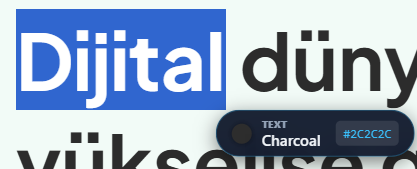
LinguaColor, web geliştiricileri ve tasarımcılar için Google Chrome Manifest V3 mimarisi üzerinde geliştirilmiş, yüksek performanslı bir renk analiz aracıdır. Eklenti, fare imlecini takip eden akıllı bir baloncuk (capsule) arayüzüne sahiptir. Kullanıcı sayfada gezinirken anlık renk verilerini sunar; ancak ekran kalabalığını önlemek adına, fare hareketsiz kaldığında (idle state) arayüz otomatik olarak kendini gizler.
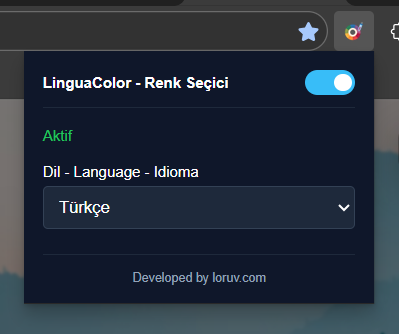
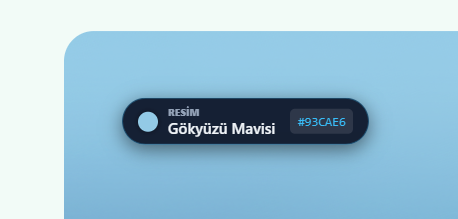


Öne Çıkan Teknik ve UX Özellikleri:
- Algısal Renk Eşleştirme: Projenin kalbinde, lineer RGB değerlerini insan gözünün renkleri algılama biçimine göre matematiksel olarak dönüştüren bir motor bulunur. Bu sayede “Koyu Kırmızı” ile “Bordo” arasındaki farkı milisaniyeler içinde ayırt edebilir.
- Akıllı Görüntü İşleme:
object-fit: covergibi modern CSS özelliklerine sahip görsellerde bile, tersine mühendislik yaparak tıklanan noktanın orijinal görseldeki tam koordinatını hesaplar. - Canvas Optimizasyonu:
willReadFrequently: trueözelliği ile donanım hızlandırmalı Canvas kullanarak, CPU’yu yormadan 60 FPS akıcılığında analiz yapar.
💻 Teknik Odak: Renk Dönüşüm Algoritması Aşağıdaki kod bloğu, projenin en kritik parçasıdır. Ham piksel verisini (RGB) alarak, renkler arası mesafeyi (DeltaE) hesaplayabilmek için Lab uzayına dönüştürür. Bu matematiksel yaklaşım, uygulamanın %99.9 doğrulukla renk tahmini yapmasını sağlar:
JavaScript:
// Renk Algısı Algoritması (Core Logic)
function rgbToLab(r, g, b) {
    let r_ = r / 255, g_ = g / 255, b_ = b / 255;

    // RGB Gamma Düzeltmesi (Gamma Correction)
    r_ = r_ > 0.04045 ? Math.pow((r_ + 0.055) / 1.055, 2.4) : r_ / 12.92;
    g_ = g_ > 0.04045 ? Math.pow((g_ + 0.055) / 1.055, 2.4) : g_ / 12.92;
    b_ = b_ > 0.04045 ? Math.pow((b_ + 0.055) / 1.055, 2.4) : b_ / 12.92;

    // XYZ Uzayına Dönüşüm
    let x = (r_ * 0.4124 + g_ * 0.3576 + b_ * 0.1805) * 100;
    let y = (r_ * 0.2126 + g_ * 0.7152 + b_ * 0.0722) * 100;
    let z = (r_ * 0.0193 + g_ * 0.1192 + b_ * 0.9505) * 100;

    // Lab Dönüşümü
    x /= 95.047; y /= 100.000; z /= 108.883;
    x = x > 0.008856 ? Math.pow(x, 1/3) : (7.787 * x) + (16/116);
    y = y > 0.008856 ? Math.pow(y, 1/3) : (7.787 * y) + (16/116);
    z = z > 0.008856 ? Math.pow(z, 1/3) : (7.787 * z) + (16/116);

    return { l: (116 * y) - 16, a: 500 * (x - y), b: 200 * (y - z) };
}
LinguaColor – Perceptual Color Analysis Engine
Google Web Store Link: https://go.emrecb.com/color-picker-web-store
Github Source Code: https://go.emrecb.com/color-picker-github
LinguaColor is a high-performance browser utility built on the Google Chrome Manifest V3 architecture. The tool features a floating info-capsule that dynamically follows the user’s cursor, providing real-time color analysis. Designed for a distraction-free experience, the interface utilizes an auto-hide mechanism that automatically fades out when the mouse stops moving.
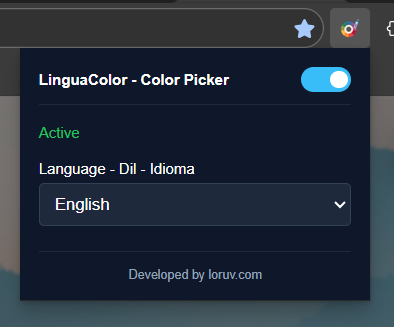
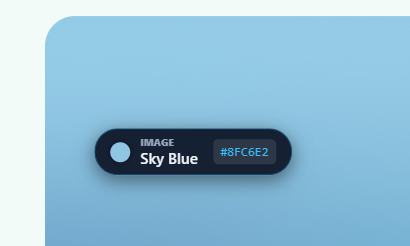

Key Technical & UX Highlights:
- Mathematical Color Modeling: Moves beyond standard RGB comparisons by implementing complex algorithms to calculate
DeltaE(color distance), allowing precise differentiation between subtle shades like “Crimson” and “Dark Red.” - Advanced DOM Geometry: Solves the challenge of sampling responsive images (
object-fit: cover/contain) by calculating the natural intrinsic coordinates of the image relative to the viewport. - Performance Engineering: Updates the UI within a
requestAnimationFrameloop and utilizesOffscreen Canvastechniques to prevent memory leaks during rapid mouse movements.
💻 Code Spotlight: The Transformation Algorithm The snippet below demonstrates the core mathematical function that powers the extension. It performs Gamma Correction and converts linear RGB data into the Lab color space, which is essential for accurate perceptual color matching:
JavaScript:
// Core Color Perception Logic
function rgbToLab(r, g, b) {
    let r_ = r / 255, g_ = g / 255, b_ = b / 255;

    // Apply Gamma Correction
    r_ = r_ > 0.04045 ? Math.pow((r_ + 0.055) / 1.055, 2.4) : r_ / 12.92;
    g_ = g_ > 0.04045 ? Math.pow((g_ + 0.055) / 1.055, 2.4) : g_ / 12.92;
    b_ = b_ > 0.04045 ? Math.pow((b_ + 0.055) / 1.055, 2.4) : b_ / 12.92;

    // Convert to XYZ Space
    let x = (r_ * 0.4124 + g_ * 0.3576 + b_ * 0.1805) * 100;
    let y = (r_ * 0.2126 + g_ * 0.7152 + b_ * 0.0722) * 100;
    let z = (r_ * 0.0193 + g_ * 0.1192 + b_ * 0.9505) * 100;

    // Final Lab Transformation
    x /= 95.047; y /= 100.000; z /= 108.883;
    x = x > 0.008856 ? Math.pow(x, 1/3) : (7.787 * x) + (16/116);
    y = y > 0.008856 ? Math.pow(y, 1/3) : (7.787 * y) + (16/116);
    z = z > 0.008856 ? Math.pow(z, 1/3) : (7.787 * z) + (16/116);

    return { l: (116 * y) - 16, a: 500 * (x - y), b: 200 * (y - z) };
}





Bir yanıt yazın